DVmods Anticheat
BetaA FiveM anticheat that shows you what is happening.
A cloud-based anticheat for FiveM servers: server-side detections, a custom rule language, a live map, screenshots and a web panel for your whole staff.
- Ready
- 17
- Beta
- 12
- Planned
- 1
Web panel
Your whole server at a glance.
Dashboard, player search, detections, punishments, module settings and an audit log. Discord sign-in with role-based permissions.
DVmods Anticheat is a FiveM resource and a cloud service in one. The resource runs detections on the server, which a cheater does not control, and the cloud panel shows your staff what happened, to whom and why.
Bans spread to all of your servers and keep working when the connection to the cloud drops. Modules, rules and the whitelist are configured in the browser, and changes reach your servers instantly without a restart.
Media
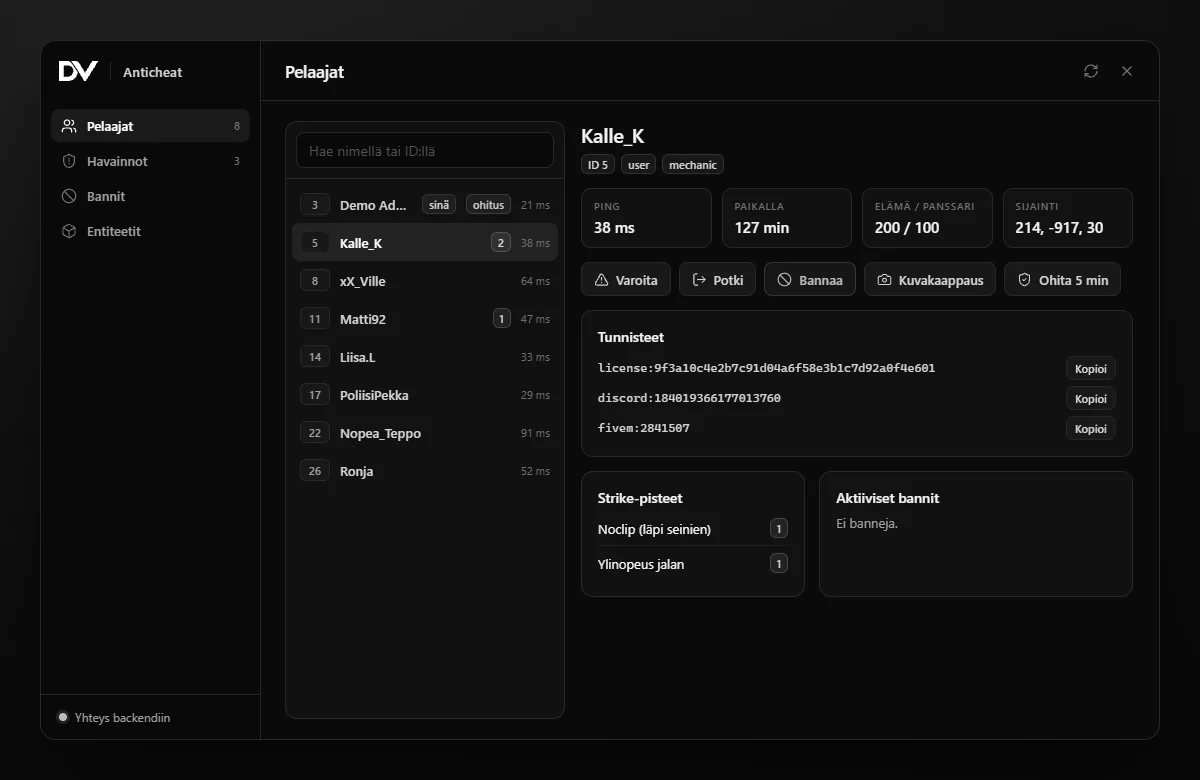
The panel in the development build.
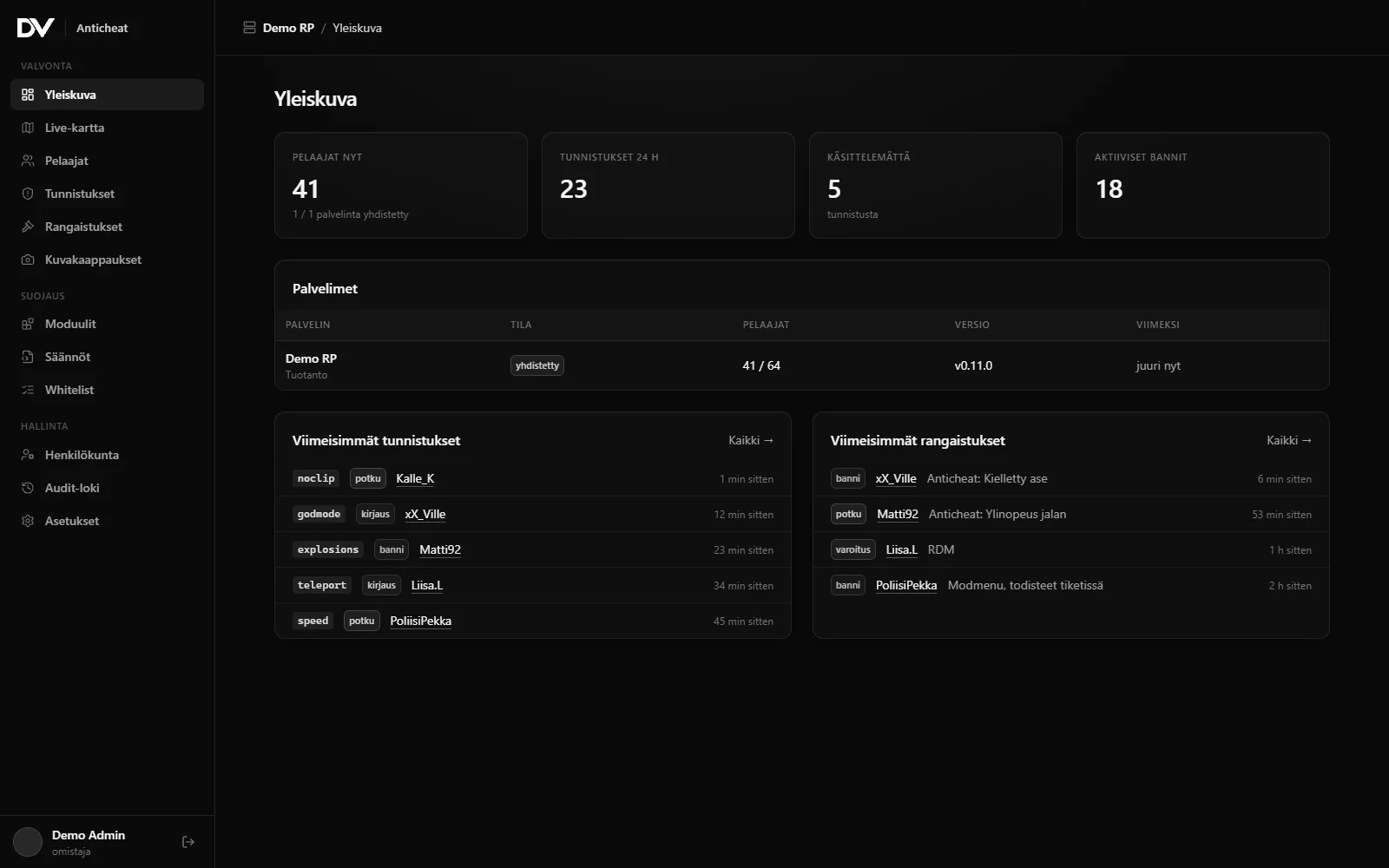
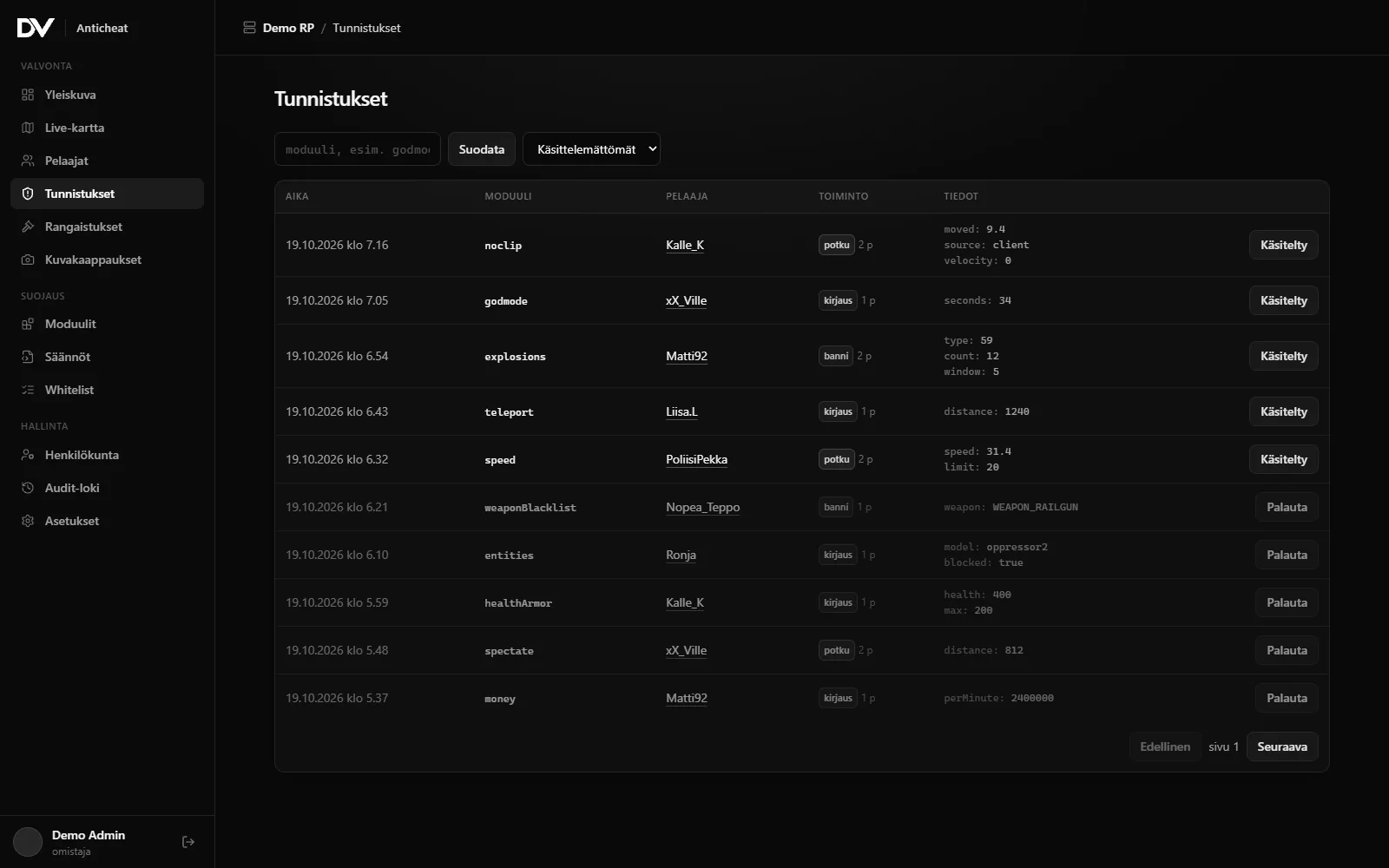
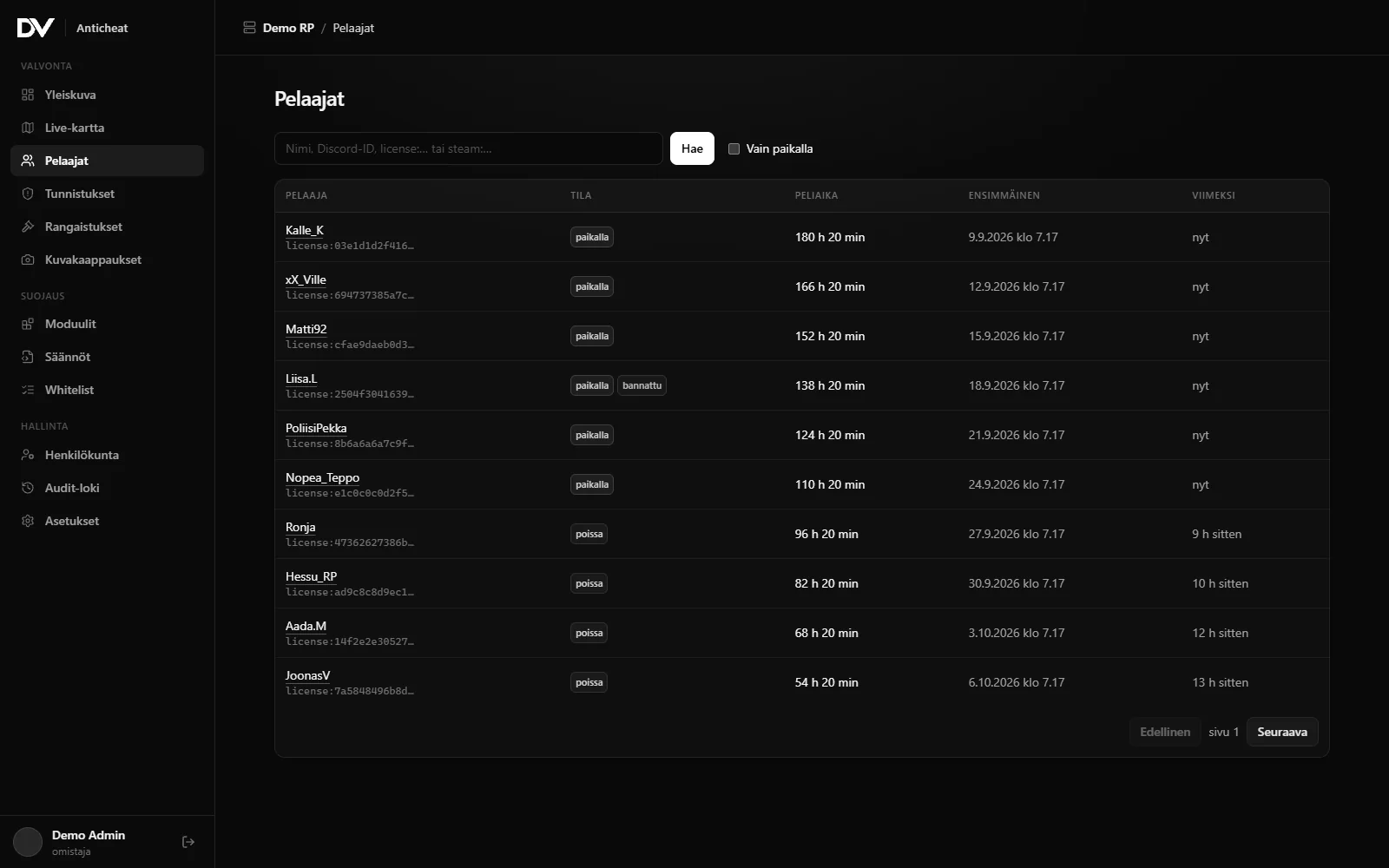
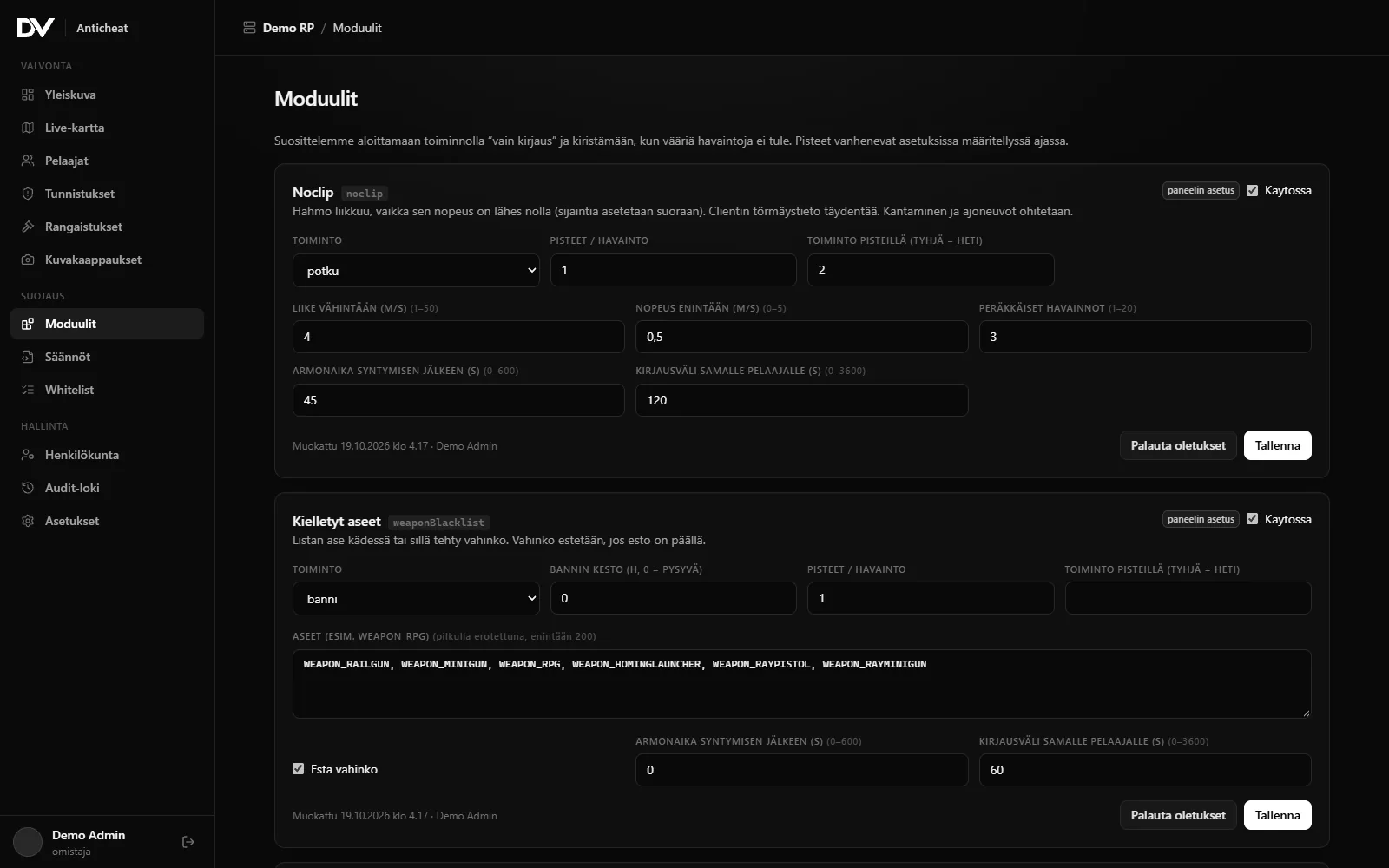
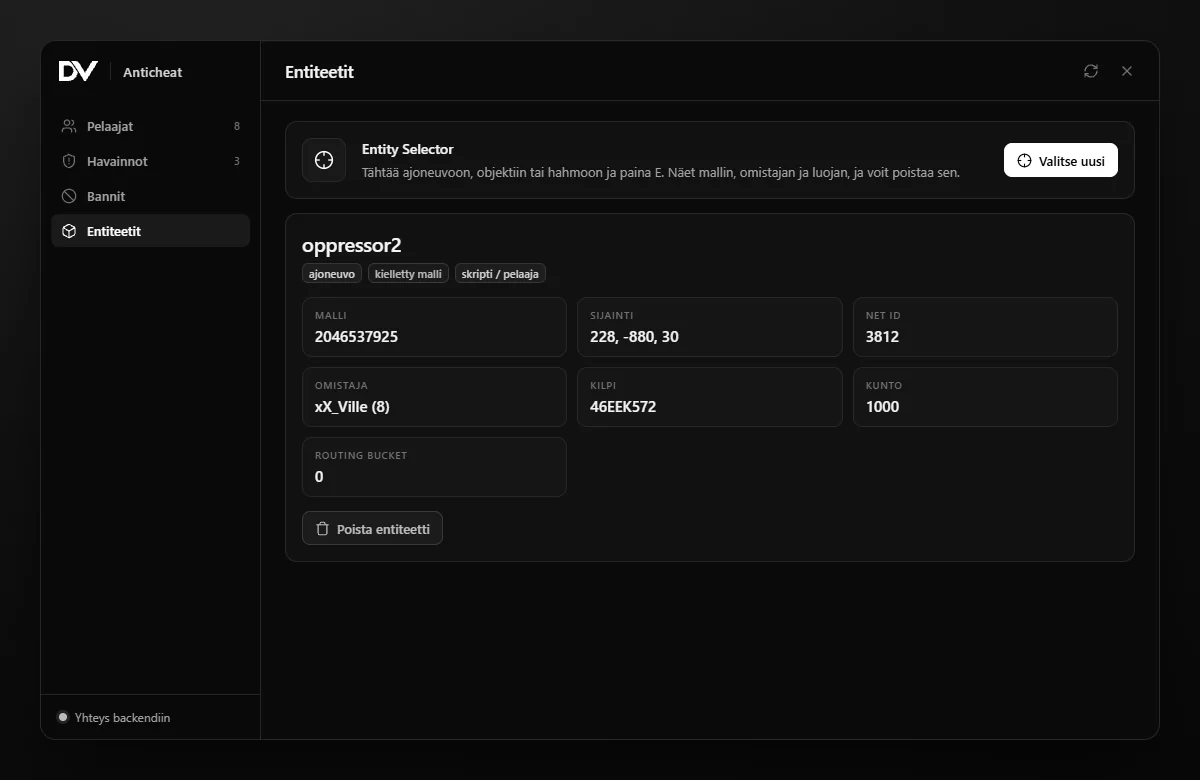
Screenshots from the development build. All data is made up and the design may still change.
In game
Moderate without alt-tabbing.
The /dvacmenu command opens the same look as the panel: players, detections, punishments and the Entity Selector in one window. Permissions are checked on the server for every action.
- 01Player details, strike points and active bans in one click
- 02Warn, kick or ban with preset durations; the reason also shows in the panel
- 03Entity Selector: aim at a vehicle or object and see who created it
- 04Take a screenshot of the player's screen straight to the panel
Screenshots from the development build. All data is made up.
Features
Every feature and its status. Ready features already work in the development build; "Planned" is in progress.
Detections
The server makes the decisions. Client signals only add context.
-
Noclip
ReadyThe character moves while its velocity stays near zero. Carrying and vehicles are ignored.
Read more: Noclip -
Teleport
ReadyAn impossible move between two checks. Death
Read more: Teleport -
Speedhack
ReadyUnrealistic on-foot speed. Falling and parachuting are ignored.
Read more: Speedhack -
Godmode and invisibility
ReadyInvincibility
Read more: Godmode and invisibility -
Weapon injection
ReadyBlacklisted weapons and weapons missing from the inventory (ox_inventory). Damage can be blocked.
Read more: Weapon injection -
Entity spawns
ReadyBlacklisted vehicles and objects are blocked and spam is logged. Ambient traffic is ignored.
Read more: Entity spawns -
Explosions
ReadyBlacklisted explosion types and explosion spam are blocked. Particle spam too.
Read more: Explosions -
Cheat menus
BetaInjected resources, resources stopped on the client, known menu commands and entities from unknown scripts. Plus trap events and network events aimed at other players.
Read more: Cheat menus -
ESX event abuse
BetaReady-made protection for the most common ESX events: call flooding and sanity checks (society withdrawals without boss rank, licences, vehicles). 28 built-in trap events that are skipped automatically when the resource is in use.
-
Money exploits
ReadySuspicious money growth per minute (ESX).
-
Aimbot
BetaThe server analyses every shot that hits a player: headshot ratio, hits from impossible distances and kill rate. The client cannot fake the analysis.
-
VPN detection
BetaDetects Tor, VPN and data centre connections on join, with optional blocking. The check runs on DVAC's own servers: player IPs are never sent to third parties.
-
Crash attempts
BetaBlocks projectile and fire spam, detects entity flooding (hundreds of script entities from one player) and objects attached to other players, with optional automatic cleanup.
Security Rules
-
Rule editor
ReadyA custom rule language for 14 game events
Read more: Rule editor
Live map
-
Live map
ReadyPlayers from all of your servers in real time
Read more: Live map
Monitoring
-
Screenshots
ReadyScreenshots from the panel or automatically on detection. Every view is logged.
Read more: Screenshots -
Screen view
BetaA player's screen in the panel at a few frames per second: full screen, freeze frame, screenshots straight from the view and a connection status bar. Open it from the profile, the live map or a multiview tile.
Read more: Screen view -
Up to 16 screens
BetaMultiview: up to 16 players' screens at once. Images are downscaled on the player's own machine, so the grid stays light, and any tile can be opened at full size.
Read more: Up to 16 screens -
Audio
PlannedListen to a player's game audio alongside the screen view.
Read more: Audio
Session Replay
-
Session Replay
BetaReplay the situation on the map straight from a detection: the player's route, health, weapon and vehicle second by second, nearby players, and hits and detections on a timeline.
In-game tools
-
In-game menu
BetaA staff menu in game (/dvacmenu): players, detections, warnings, kicks, bans and screenshots.
-
Entity Selector
BetaAim at a vehicle, object or ped to see its model, owner and whether a script created it. Delete it with one click.
Bans
-
Ban evasion protection
ReadyA ban matches several identifiers and hardware tokens
Read more: Ban evasion protection -
Works during outages
ReadyBans and settings are cached on the server. The license has a signed grace period.
Read more: Works during outages
Web panel and mobile
-
Web panel
ReadyDashboard
-
Roles and permissions
ReadyOwner
-
Discord notifications
ReadyDetections
Read more: Discord notifications -
Mobile app (PWA)
BetaInstall the panel on your phone or computer: push notifications for detections, punishments and server status with per-device settings, and recently viewed pages work offline.
For developers
-
Exports
Readyexports.dvac: ban, kick, warn, whitelist and screenshot from your own scripts.
Read more: Exports -
Public API
BetaA REST API for your own tools and bots: players, detections, punishments and ban checks with per-key permissions. OpenAPI description included.
Read more: Public API
Live detection
Teleport. Detected. Banned.
How a detection flows: the server notices an impossible move, logs it, counts strikes and takes the configured action. The demo uses made-up data.
- 01 A player moves 1,240 m in two seconds
- 02 The server logs a detection: TELEPORT
- 03 Strike points reach the limit
- 04 Banned on every server
Why server-side
A cheater controls their game, not your server.
A check that only runs in the client lives on the cheater's own machine, where it can be bypassed. DVmods Anticheat makes its decisions on the server and uses client data only as extra context.
| Aspect | Client-only check | DVmods Anticheat |
|---|---|---|
| Where decisions happen | Client-only check:On the player's machine | DVmods Anticheat: On the server (OneSync) |
| Bypassing | Client-only check:A cheater can modify or stop the check | DVmods Anticheat: Server-side checks are out of the cheater's reach |
| Bans | Client-only check:Often a file on a single server | DVmods Anticheat: Across all your servers, even during outages |
| Changing settings | Client-only check:Edit a config and restart | DVmods Anticheat: From the panel, live instantly without a restart |
| Visibility | Client-only check:Console logs | DVmods Anticheat: Web panel, live map, screenshots, audit log |
Security Rules
Custom rules without code.
Write a condition for a game event and pick an action. The panel validates the rule before saving, and it reaches your servers instantly without a restart.
data.isScript and data.model in [hash("rhino"), hash("hydra")] and player.group != "admin" Live map
See your players in real time.
Positions come from the server about once a second, and only while someone is watching the map. You can plug in your own map tiles in the panel.
Setup
Four steps.
- 01
Buy on Discord
Pick a plan in the DVmods Discord. You get a license key and access to the panel.
- 02
Download the resource
Download the dvac resource and copy it into your server resources folder.
- 03
Add it to server.cfg
Two lines: the license key and ensure. The key stays on the server, hidden from players.
- 04
Manage from the panel
Sign in to panel.dvmods.site with Discord, tune the modules and add your staff.
set dvac_license "dvac_live_xxxxxxxxxxxxxxxx" ensure dvac Roadmap
What is ready and what is coming.
This list is generated straight from the feature statuses. We do not promise dates: a feature moves to ready when it works reliably.
Ready
17- Noclip
- Teleport
- Speedhack
- Godmode and invisibility
- Weapon injection
- Entity spawns
- Explosions
- Money exploits
- Rule editor
- Live map
- Screenshots
- Ban evasion protection
- Works during outages
- Web panel
- Roles and permissions
- Discord notifications
- Exports
In progress
12- Cheat menus
- ESX event abuse
- Aimbot
- VPN detection
- Crash attempts
- Screen view
- Up to 16 screens
- Session Replay
- In-game menu
- Entity Selector
- Mobile app (PWA)
- Public API
Up next
1Pricing
Plans
Purchase and payment happen on Discord.
Pricing coming soon
The anticheat is in development. Beta testers can join already: ask on Discord.
Anticheat FAQ
How do I install the anticheat?
Copy the dvac resource into your server resources folder and add your license key (set dvac_license) and ensure dvac to server.cfg. Screenshots also need the open-source screenshot-basic resource. Everything else is configured in the web panel.
Which frameworks are supported?
The ESX bridge is included. Core detections (movement, weapons, explosions, entities, rules) work without a framework. QBCore, QBox and vRP bridges are planned; you can also write your own, as the bridge is an open file.
Does the anticheat slow down my server?
The anticheat is designed to be light. There are no Wait(0) loops on the server, checks are staggered across players and heavy work (network, crypto) runs in a separate JS bridge. We will publish measured numbers during beta testing.
What about false bans?
Every module starts in log-only mode, so you see detections before enabling punishments. Strike points, grace periods, the whitelist (ACE, ESX groups, panel) and unbanning from the panel all help. Every ban has a code the player can use to appeal.
What data is stored?
Player identifiers (e.g. Rockstar license, Discord ID), names, sessions, detections and punishments. IP addresses, images and old data are deleted after a retention period you can adjust in the panel. Data is separated per server at the database level.
Does it work if the cloud service is down?
Yes. Detections run on the server, bans and settings are cached locally and events are queued for later. The license has a signed grace period.
How do I buy the anticheat?
The anticheat is in development. Join the Discord to become a beta tester and hear first about pricing and launch.
Ready to protect your server?
Purchases, support, updates and beta testing all happen on Discord.